


















Dhanya


TL;DR
A 360 review gets feedback from your boss, coworkers, and yourself to show your performance. This helps you find things to work on, know yourself better, and work better as a team. Peoplebox.ai can do this automatically, which saves HR time and helps reviews create real progress.
A 360-degree feedback review collects input about an employee from their manager, peers, direct reports, and the employee themselves, rather than relying on a single manager’s opinion. It’s used mostly for development, not for deciding pay.
Most 360 performance reviews still boil down to one person’s take on your work. Your manager. That’s it. One perspective, once a year, often based on whatever they remember from the last few weeks.
360 feedback fixes that gap by pulling in everyone who actually works with you. Below: what it is, how the process runs step by step, who should be involved, sample questions, a free template, the real pros and cons (including why a chunk of employees actively hate it), and when to skip it entirely.
What Is 360-Degree Feedback?
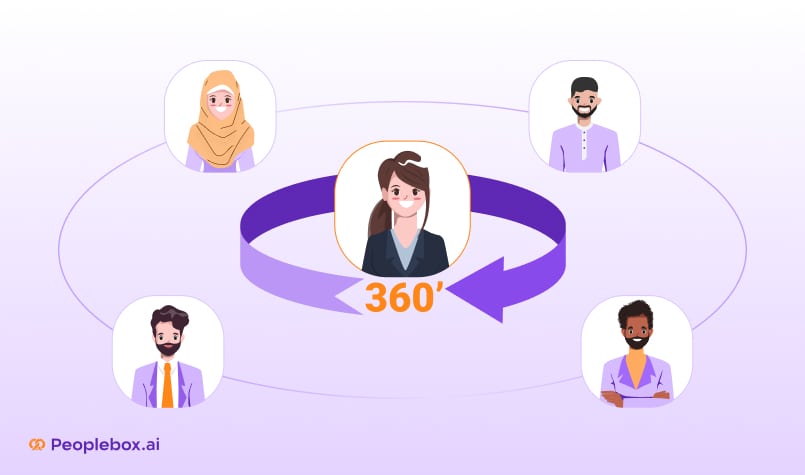
360-degree feedback is a review method in which an employee is rated by the people around them (manager, peers, direct reports, and the employee) rather than by a manager alone. It’s called “360” because feedback comes from every direction, not just from the top down.
A few things make it different from a normal review:
- It’s usually anonymous
- It pulls from 4 to 8 reviewers at once
- The goal is self-awareness, not a raise
- It runs best as a development tool, kept separate from pay decisions
That last point matters more than most companies admit. HR consultant Carolyn Troyan put it bluntly to SHRM: “Performance management is broken and should be untied from comp.” When 360 scores affect pay, people start rating their friends kindly and their rivals harshly. The whole thing turns political fast. (SHRM, 2025)
Why Use 360 Feedback At All?
Because one person’s view of your performance is, by definition, incomplete. Your manager sees your output. They rarely see how you actually behave in a stand-up, how you handle a heated Slack thread, or how your direct reports feel about your 1:1s.
A 360 review adds those angles back in. Peers catch collaboration issues a manager misses. Direct reports catch leadership blind spots a manager can’t see from above. Self-review shows you where your self-perception and reality don’t line up.
None of this replaces manager judgment. It supplements it.
The 360 Performance Review Process: 8 Steps
The process runs in 8 stages, from picking reviewers to closing the loop months later.
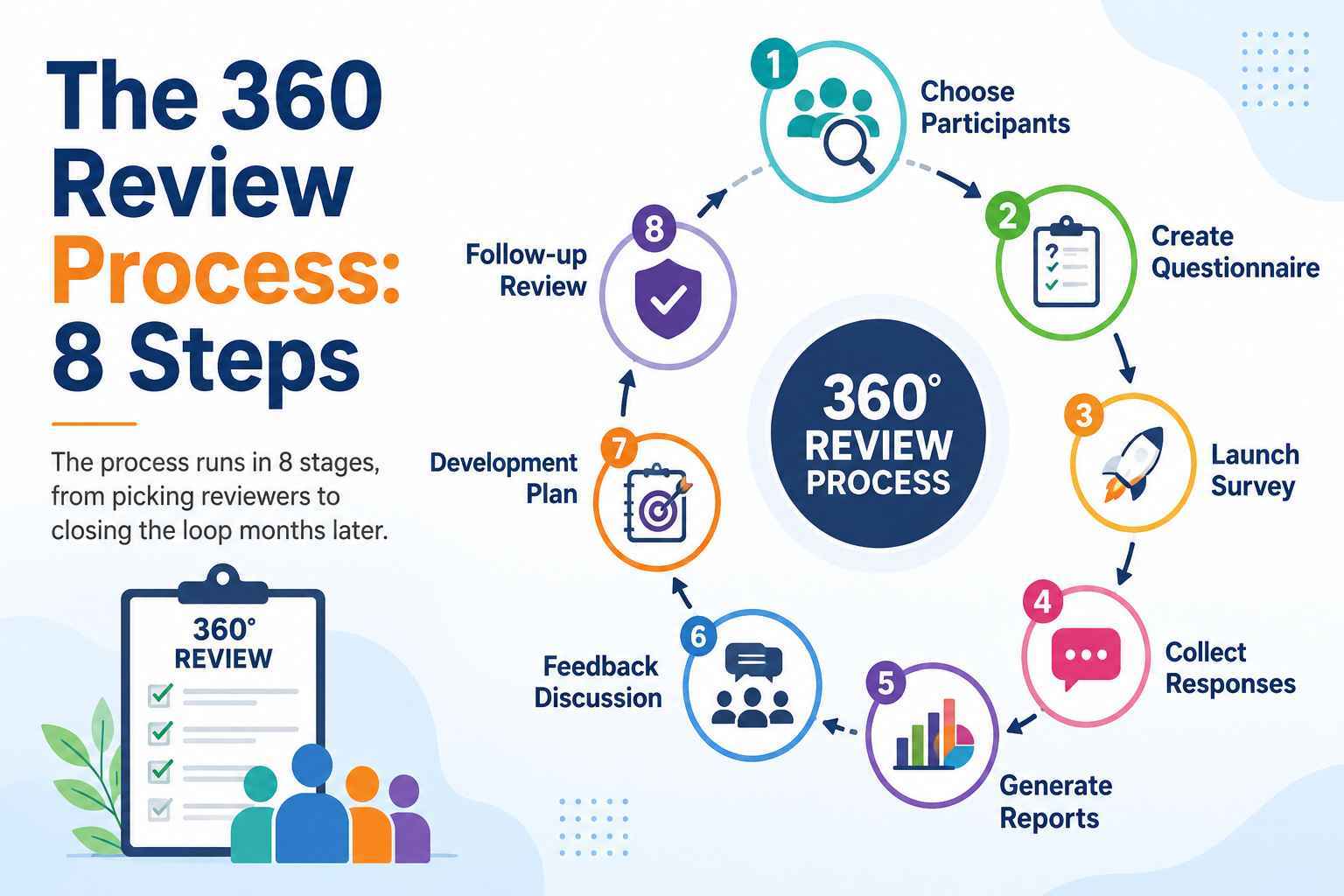
Step 1: Choose Participants
Pick people who actually work with the employee, not just anyone on the org chart. Manager, 2 to 4 peers, direct reports if applicable, and the employee themselves for self-review.
Step 2: Create the Questionnaire
Build the survey around specific competencies: communication, leadership, collaboration, decision-making. Mix rating scales with a couple of open-ended questions per section. Aim for 7 to 10 questions total; fewer and you don’t get enough signal, more and quality drops off fast.
Step 3: Launch the Survey
Send it out with a clear deadline and a real confidentiality promise. If people don’t trust the anonymity, you get generic, watered-down answers.
Step 4: Collect Responses
Chase incomplete responses with automated reminders instead of manual follow-up emails. This is the single easiest thing to automate and the thing HR teams waste the most hours on.
Step 5: Generate Reports
Aggregate responses by rater group (manager, peer, direct report, self) so the employee can see where groups agree and where they don’t. Disagreement across groups is often the most useful signal in the whole report.
Step 6: Feedback Discussion
A manager, HR partner, or coach walks the employee through the themes, not every individual comment. One harsh comment out of 8 reviewers isn’t a pattern. Three similar comments from different reviewers is.
Step 7: Development Plan
Turn 2 or 3 of the clearest findings into specific goals. Not 10. Nobody acts on 10 things at once.
Step 8: Follow-up Review
Check progress at the next cycle. Skip this step and the whole exercise turns into busywork employees stop taking seriously.
360 Performance Review vs. Traditional Performance Review
| Traditional Review | 360 Review | |
| Who evaluates | Manager only | Manager, peers, reports, self |
| Frequency | Usually annual | Continuous or project-based |
| Perspective | Single viewpoint | Multiple, cross-checked |
| Main use | Ratings, pay decisions | Development, self-awareness |
| Bias risk | Higher (one rater’s blind spots) | Lower, but not zero |
The short version: a traditional review tells you what your manager thinks of you. A 360 tells you what everyone thinks, which is a very different (and often more useful) conversation.
Who Should Be in a 360 Performance Review
Most 360 reviews draw from 5 or 6 reviewer types.
- Manager. Job performance, priorities, goal progress.
- Peers. Day-to-day collaboration, communication, reliability.
- Direct reports. Leadership style and support, visible only from below.
- Cross-functional partners. Useful for roles with heavy dependency on other teams.
- Self-review. The employee’s own take, compared against everyone else’s.
- Customers (optional). For client-facing roles only, and only with clear scoping.
Keep the reviewer list to people with real, regular interaction with the employee. A peer who worked with them once on a two-week project isn’t going to give you much beyond generic politeness.
Competencies Commonly Measured
Most 360 questionnaires are organized around a fixed set of competencies instead of open impressions:
- Leadership
- Communication
- Collaboration
- Accountability
- Customer focus
- Innovation
- Strategic thinking
- Coaching
Organizing by competency, not by rater type, makes it much easier to spot patterns across reviewers.
Sample 360 Performance Review Questions by Competency
Behavioral, specific questions beat vague ones every time. “Is this person a good communicator?” gets you nothing. “Describe a time this person explained something complex clearly” gets you an actual example.
Communication
- Rate how clearly this person communicates to both technical and non-technical audiences (1 to 5).
- Describe a time they communicated a difficult message well.
Leadership
- Rate how effectively this person sets priorities for their team (1 to 5).
- What could they do to better support their team’s workload?
Collaboration
- Rate how reliably this person partners with other teams (1 to 5).
- Give an example of them going out of their way to help a colleague.
Decision-Making
- Rate how well they weigh trade-offs before deciding (1 to 5).
- Describe a decision they made that had a clear impact, good or bad.
Free 360 Performance Review Template
Copy this straight into a spreadsheet or your feedback tool. Three columns per competency: rating, comments, done.
| Competency | Rating (1 to 5) | Comments (specific examples) |
| Communication | ||
| Leadership | ||
| Collaboration | ||
| Decision-Making | ||
| Accountability | ||
| Innovation | ||
| Customer Focus | ||
| Strategic Thinking | ||
| Coaching |
Repeat the table once per rater group (manager, peer, direct report, self) so results can be compared side by side at the reporting stage.
Benefits of 360-Degree Feedback
For the employee
- Surfaces blind spots. You find out how you actually come across, not how you think you come across.
- Sharper self-awareness. Patterns that show up across multiple reviewers are hard to argue with.
- Better coaching material. Specific, behavioral feedback gives a coach or manager something concrete to work with.
For the team
- Fewer unspoken frustrations. Structured feedback beats letting resentment build quietly.
- Stronger accountability. People know their behavior is visible to more than just their manager.
For the organization
- Better leadership pipeline data. Consistent 360 results over time help identify who’s actually ready for more responsibility.
- Lower reliance on one rater’s opinion. Aggregating across reviewers dilutes any single person’s bias, favoritism, or grudge.
- Better succession planning. A track record of 360 results across cycles gives leadership real evidence for who’s ready for more scope, instead of a gut call.
Challenges and Risks (Read This Before You Roll It Out)
Here’s the part most vendor content skips: a lot of employees genuinely dislike 360 reviews, and the data backs that up.
A 2025 LiveCareer survey of 1,000 workers, reported by SHRM, found:
- 79% would opt out of 360-degree feedback if given the choice
- 74% feel results are unfair, biased, or inaccurate
- 79% suspect colleagues use feedback to settle personal grudges
- 48% believe it amplifies office politics instead of honest evaluation
- 39% experienced strained workplace relationships because of it
- 35% reported increased stress or self-doubt
- 30% noticed decreased productivity and motivation afterward
Anonymity is also more complicated than it looks. In the same survey, 62% said anonymous feedback encourages honesty, but 28% said it leads to vague, unconstructive criticism instead. As SHRM’s Jay Jones put it: “It allows staff to give a true opinion, and hopefully a constructive opinion. HR must guard against retaliation against those providing feedback.”
Beyond the survey data, watch for these operational failure points:
- Survey fatigue. Ask people to rate 6 colleagues every quarter and quality drops fast.
- Poor question design. Vague questions get vague answers.
- Inconsistent rating standards. A “4” from one rater doesn’t mean the same thing as a “4” from another.
- No coaching after the report. Handing someone a report with no debrief just leaves them confused or defensive.
- Feedback overload. Ten action items at once means zero get actioned.
- Reviewer bias. Personal relationships and office politics color scores no matter how anonymous the form is.
- Resistance to participating. Employees who don’t trust the process give one-word, low-effort answers.
- Time cost for HR. Chasing raters and manually building reports eats hours that should go to coaching instead.
When to Use 360 Feedback
- Leadership development. Helping high-potential people see how their team actually experiences their leadership.
- Annual cycles. As a supplement to manager review, not a replacement.
- Post-project reviews. Evaluating collaboration and communication after a big cross-functional push.
- Culture change efforts. When an org is deliberately building a feedback-first culture.
When NOT to Use 360 Feedback
Knowing when to skip 360 feedback matters as much as knowing when to run it.
- Probation periods. New hires haven’t built enough history with peers for the feedback to mean anything.
- Very small teams. If there’s only 1 or 2 possible reviewers per category, anonymity is fake and everyone knows whose comment is whose.
- High-conflict environments. Existing tension turns a 360 into a tool for retaliation, not development.
- Performance improvement plans (PIPs). PIPs need clear, manager-owned expectations. Spreading that across anonymous raters muddies accountability and can create real legal risk.
- Compensation-only decisions. Using 360 scores as the sole input for pay or promotion pushes people to game the system: rate your friends up, rate your rivals down, and stop giving honest feedback altogether.
How Real Companies Handle 360 Feedback
The trend among large employers: move away from one heavy annual 360 process and toward lighter, more frequent feedback loops.
Google blends peer, manager, and direct-report input with self-assessment. Employees and managers jointly pick peer reviewers, feedback stays anonymous, and results feed into calibration sessions where groups of managers compare ratings. Google pairs this with monthly manager check-ins so the annual review isn’t the only feedback moment.
Microsoft runs peer feedback through an internal tool called Perspectives, where colleagues flag what someone should “keep doing” and what to “rethink.” The twist: feedback goes straight to the employee, not filtered through a manager, and it isn’t anonymous. That’s a deliberate choice to make feedback ownable. It’s paired with “Connects,” recurring manager conversations at least every two months.
Adobe dropped formal annual reviews and ratings entirely in favor of “Check-In,” an ongoing conversation model. Employees had specifically asked for more peer perspective, so Adobe let managers and employees request peer feedback anytime, with no formal rating attached.
Deloitte found its traditional annual 360 process was too heavy relative to what it delivered and moved to a much lighter model: weekly or biweekly team-lead check-ins plus a short quarterly performance snapshot, focused on strengths and forward-looking coaching rather than retrospective multi-rater scoring.
Accenture replaced its annual rating and ranking system with “Performance Achievement,” swapping backward-looking, comparative scoring for frequent, forward-looking coaching tied to the employee’s own role rather than a curve against peers.
Takeaway: heavy, once-a-year, all-at-once 360 processes tend to get replaced or supplemented with lighter, more frequent, more targeted feedback. That’s a useful design principle even if you’re building your own process from scratch.
360 Performance Review Best Practices Checklist
- Define the objective. Developmental, evaluative, or both, and say so upfront.
- Pick reviewers carefully. Real, regular interaction with the employee, not just anyone available.
- Guarantee anonymity. No trust in the process means no honest answers.
- Train participants. Teach raters to give specific, behavioral feedback. Teach recipients to treat it as data, not a verdict.
- Use behavioral questions. Rating scale plus a specific example, every time.
- Hold a real coaching session. A report with no conversation attached gets ignored.
- Track progress next cycle. Otherwise, the whole process resets to zero every year.
Examples of Useful Feedback
Good feedback is specific and behavioral. Compare:
- Vague: “Jane is a good communicator.”
- Useful: “Jane consistently translates complex technical concepts into language non-technical stakeholders actually understand.”
- Vague: “Mark needs to work on management.”
- Useful: “Mark sets clear direction at the start of projects, but his team would benefit from more frequent check-ins on workload and bandwidth.”
- Vague: “David is reliable.”
- Useful: “David consistently meets deadlines and proactively supports teammates when the team is under pressure.”
How HR Teams Can Automate the 360 Performance Review Lifecycle
Manual 360 reviews (chasing raters over email, aggregating spreadsheets by hand, writing reports one at a time) are exactly what causes the survey fatigue and lack of follow-through covered above. Automating the feedback lifecycle makes 360 feedback sustainable, rather than a once-a-year scramble nobody looks forward to.
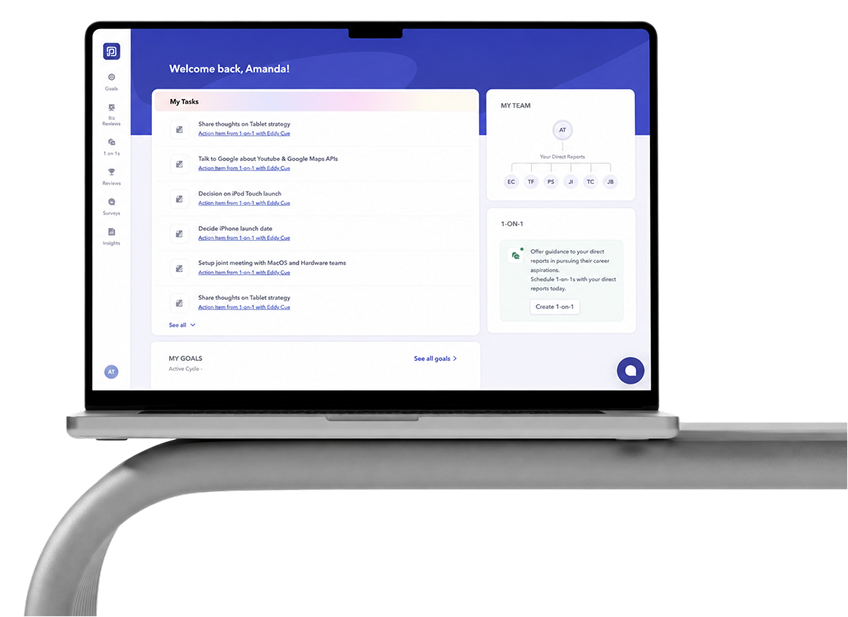
That’s the specific problem Peoplebox.ai is built around. Instead of running 360 feedback as a manual event, it turns it into a connected workflow:
- Customizable review cycles that match how your org actually wants to run multi-rater feedback
- Automated reminders so raters finish on time without HR chasing anyone manually
- OKR and goal integration to connect feedback directly to performance goals
- Analytics and dashboards that surface patterns across teams and track progress over time
- Native integrations with Slack, MS Teams, Jira, and other tools people already use
- Less administrative overhead, so HR time goes into coaching and strategy instead of spreadsheet cleanup
Make Your 360 Performance Reviews Count
The gap between a 360 process people trust and one they’d opt out of usually comes down to execution: clear objectives, real anonymity, behavioral questions, and an actual coaching conversation once the report lands. Get those right, and it becomes one of the sharpest development tools HR has. Skip them, and you’re just generating paperwork nobody reads.
FAQs
What do you think about the 360-degree performance review?
The 360-degree performance review works well as a development tool and badly as a pay decision tool, and that distinction determines whether employees trust it. Used for self-awareness it adds perspectives a manager cannot see; tied to compensation, it turns political fast.
How to respond to a 360 performance review?
Respond to a 360 performance review by looking for patterns across reviewers rather than reacting to single comments, then picking two or three themes to act on. One critical remark out of eight raters is noise; three similar ones are a signal. Avoid trying to work out who said what.
What is the most important benefit of a 360 FEEDBACK review?
The most important benefit of a 360 feedback review is surfacing blind spots: it shows how you actually come across to peers and direct reports, not how you assume you do. A manager sees your output, but only direct reports see your leadership from below.
What are some common mistakes to avoid in performance reviews?
Common performance review mistakes are recency bias, vague non-behavioral feedback, inconsistent rating standards between managers, and delivering a report with no conversation. Add too many action items and none get done; two or three specific goals beat a list of ten.
Are 360 performance reviews effective?
360 reviews are effective for development when run well, but trust is fragile: a 2025 survey reported by SHRM found 74% of employees think the results are unfair or biased. Effectiveness comes down to real anonymity, behavioral questions, coaching, and keeping scores away from pay.
How does the 360-degree evaluation method work?
The 360-degree evaluation method runs in eight steps: pick reviewers, build the questionnaire, launch it, collect responses, report, discuss, plan development, and follow up. Reports group results by rater type so the employee can see where manager, peer, and self views diverge.
Author

Content Writer & SEO Specialist
I’m Rohitha Polavarapu, a Content Writer Associate at Peoplebox.ai, where I research and write about the evolving world of HR, AI, and employee experience. I joined the Peoplebox.ai editorial team in March 2025 after completing my MBA in Digital Marketing and Business Analytics from CMR University.
At Peoplebox.ai, I focus on creating content that simplifies complex HR and technology concepts from AI interviewers to performance management software and turns them into actionable insights for HR leaders and recruiters. My writing helps organizations make smarter, data-backed talent decisions while keeping the human element at the core of hiring and performance.
I explore topics such as recruitment automation, employee engagement, and the future of work, examining how AI empowers people leaders to make better decisions. When I’m not writing, I’m usually reading about new HR tech innovations or brainstorming ways to make HR content more engaging and relatable.
View profile 
Top Picks




YOU'VE READ THE PLAYBOOK
Now see it running - live, on your org chart
A 30-minute walkthrough of reviews, goals and 1:1s inside Slack & MS Teams. No slides, just the product.
Request a Demo