


















Dhanya

How to Set Up Employee Pulse Surveys in 2026: The 4-Week Rollout Playbook
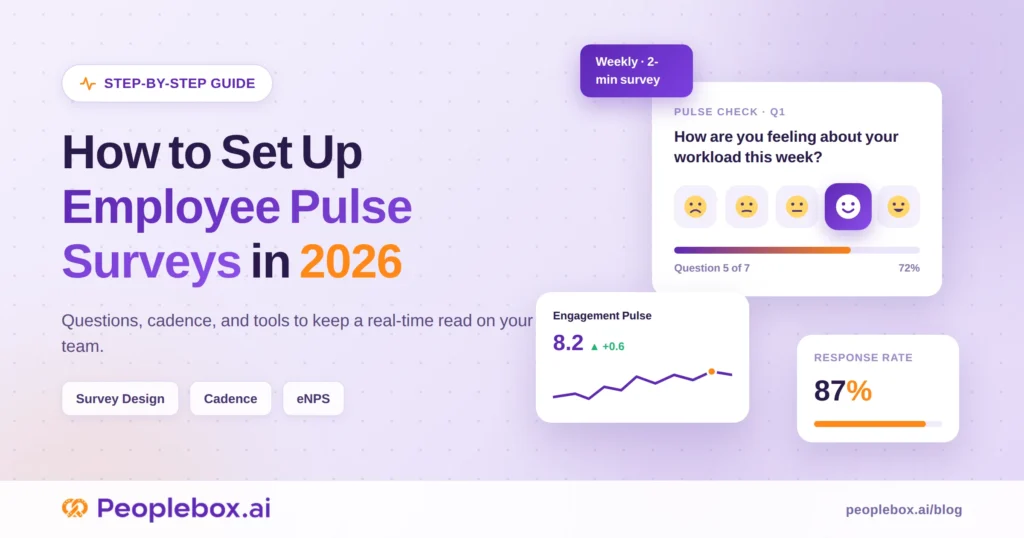

Setting up an employee pulse survey program is not just about choosing questions and sending a form.
To make the program useful, you need five decisions in place before launch: what you want to learn, how often you will ask, how anonymity will be protected, who will own follow-up, and when employees will hear back.
This guide provides a practical 4-week rollout plan to launch an employee pulse survey program in 2026.
You will learn how to define the goal, choose the right questions, set up segmentation, communicate the launch, analyze results, and turn employee feedback into visible action within 14 days.
Here’s what’s inside:
- A 4-week rollout blueprint
- Question bank organized by pulse type
- Cadence decision matrix for choosing the right survey frequency
- Manager enablement checklist for turning feedback into action
- Buyer’s checklist for choosing the right pulse survey tool
What is an employee pulse survey (and how does it differ from an annual engagement survey)
An employee pulse survey is a short, recurring set of 5 to 15 questions sent between annual engagement surveys. It measures sentiment on one focused theme in near real time.
The differences from an annual engagement survey are simple:
- Length: narrow, not comprehensive
- Speed: days, not months
- Purpose: built to be acted on within 14 days
Three formats get called “pulse surveys” in HR software today. Each does something different.
| Dimension | Annual engagement survey | Pulse survey | Ad-hoc pulse |
| Frequency | Once a year | Weekly, monthly, or quarterly | One-off, event-triggered |
| Length | 40 to 80 questions | 5 to 15 questions | 3 to 10 questions |
| Scope | Full engagement model | One theme per cycle | One specific event |
| Time-to-action | 8 to 12 weeks | Within 14 days | Within 7 days |
| Best used for | Strategic HR planning | Trending sentiment between annuals | Change events, incidents, launches |
Why set up pulse surveys in 2026: the business case in three numbers
The case for a pulse survey program comes down to three numbers:
- Employees actively want more frequent feedback
- Companies that ask more often see materially higher engagement
- Programs that act on results earn compounding trust over time
Number 1: Employees want to be asked more often
Qualtrics research shows 77% of employees want to give feedback more than once a year. Most would prefer four times a year.
Meeting that expectation is one of the cheapest engagement wins available to an HR team.
Number 2: Cadence itself lifts engagement
According to the same research cited above, companies that ask employees for feedback quarterly report engagement levels of 78% to 81% favorable, compared to 49% at companies that never ask.
Moving from “no feedback loop” to “quarterly pulse” is worth roughly 30 engagement points before you change anything else about how you manage people.
Number 3: Closing the loop is the multiplier
Gallup research shows that only 8% of employees strongly agree that their organization takes action on surveys.
That’s the ceiling most programs never reach. The programs that do share results within 14 days and commit to visible actions see response rates climb over time and earn compounding trust cycle over cycle.
The rule that makes pulse surveys work
The value of a pulse survey program comes from what happens after employees respond.
Share results quickly, name the actions you will take, and tell employees when they will hear an update. A simple default is to close the loop within 14 days of the survey closing.
For where pulse programs fit into a broader engagement strategy, see our guide to employee engagement software.
5 Decisions to Make Before You Launch Your Employee Pulse Survey
Before you send your first pulse survey, align on five decisions.much
- Define the objective. What is the one outcome this pulse program should support in the next 90 days?
- Choose the cadence. Decide whether monthly, quarterly, or event-triggered pulses match your organization’s ability to act.
- Set the anonymity threshold. Decide the minimum number of responses required before results can be shown for a team, department, location, or tenure group.
- Assign ownership. Name who will analyze results, who will communicate findings, and who will own follow-up actions.
- Decide how quickly employees will hear back. A good default is within 14 days of the survey closing.
Once these decisions are clear, the 4-week rollout becomes much easier.
Stop running pulse surveys no one reads the results of
Peoplebox runs pulse surveys, eNPS, and engagement surveys inside Slack and Teams: with AI-driven sentiment analysis, manager-level action plans, and dashboards that turn feedback into follow-through.
How to Set Up Employee Pulse Surveys: The 4-week rollout blueprint
Here’s a concrete, week-by-week calendar for standing up a pulse program from scratch.
You should be able to open this on Monday morning and start.
Week 1: Stakeholder alignment and objective definition
Get CEO and CHRO sponsorship on a one-page charter.
The charter answers one question: what’s the single outcome this program will produce in 90 days? Not five outcomes. One.
Name three humans on the charter
- The sponsor. A leadership team member accountable for the program.
- The analyst. Usually you or someone on your People Ops team.
- The action owner. The person who owns follow-through on whatever cycle one surfaces.
Set your anonymity policy in the same week
A workable default is 5 to 10 respondents per reporting segment, in line with the industry norm recommended by survey science firm WSA.
Any team smaller than that gets rolled up into a larger group. This rule protects employees. It also protects you from having to make risky segmentation calls under time pressure later.
In Peoplebox.ai, the minimum respondent threshold is enforced at the platform level. Any segment view that falls below the threshold automatically collapses into its parent view. Admins can’t override it on a case-by-case basis, which is the point.
Week 1 deliverable: one-page charter, signed by CEO and CHRO.
Week 2: Question design and tool setup
Pick one theme for cycle one
Don’t try to measure engagement, well-being, DEI, and manager effectiveness in the same survey. You’ll get shallow data on all four.
Pick one theme. (See the categorized question bank below for how to think about theme choice.)
Cap the survey length
- Monthly cadence: 8 to 10 questions
- Quarterly cadence: 12 to 15 questions
- Time-to-complete target: under 5 minutes
Anything longer punishes participation.
Build the survey artifact
Once your questions are locked, the build takes about 30 minutes. Six steps:
- Name the survey with a date, not a category. “March 2026 Engagement Pulse” reads more real than “Employee Engagement Survey.”
- Add branding. Your company logo, a cover image, and a short description at the top of the survey. Employees clicking into a plain vendor UI subconsciously read “vendor form.” A branded survey reads, “Our company is asking.”
- Write the description with three things: what you’re asking, how anonymity is protected, and when employees will hear back.
- Order questions from easiest to hardest. Start with the eNPS or a simple 5-point rating. Save open-text for the end.
- Cap open-text at one question per survey. More than one drop in completion rate materially.
- Add the analyst and action owner as collaborators on the survey and results dashboards so nothing gets gated behind a single person.
Configure segmentation in your tool
Set up these segments at a minimum:
- Department
- Tenure band
- Location
Test that the tool automatically refuses to show a segment view when the respondent count falls below your anonymity threshold. If it can’t enforce that automatically, either switch tools or move to a manual reporting step. Don’t skip the check.
You can pull segmentation directly from the org chart synced from your HRIS in Peoplebox.ai, so you don’t have to rebuild it every cycle. Segment views that fall below the anonymity threshold are automatically blocked, including for admins.
Week 2 deliverable: question set locked, segmentation tested end-to-end.
Week 3: Launch communication and fielding
Send the launch email 48 hours before the survey opens
That email should tell employees three things:
- What you’re asking
- How is their anonymity protected
- When they’ll hear back, and what will change
Point 3 is the one most launch emails miss. It’s also the one that most affects response rates.
Match delivery channel to where employees actually work
Where you send the pulse matters as much as when.
- Email link. The default. Works, but competes with dozens of other emails in the inbox.
- Instant-messaging channel. Highest response rates for desk-based teams where messaging is the primary work tool.
- In-app or embedded widget. Best for frontline and deskless workforces where email is checked once a week.
Pick one primary channel. Cross-posting to all three creates confusion about which link is “the real one” and depresses the response rate.
Track daily response rate
Enable submission notifications (via an email digest or a dedicated team chat channel) so the analyst can see velocity by segment without logging into the tool. Response rate lag needs to be detected within hours, not days.
If a specific segment lags 48 hours in, avoid sending a company-wide reminder that dilutes the signal. Send a targeted manager nudge to that segment instead.
Company-wide reminders read as noise. Manager nudges read as care.
In Peoplebox: real-time submission notifications flow to the analyst and manager. Managers can send targeted nudges to their team through the same platform, so the reminder flow lives where the work happens.
Keep the fielding window tight
Field for 5 to 7 business days, no longer. Extending the fielding-to-chase response rate actually degrades pulse quality. Late responders skew toward one end of the sentiment distribution, thereby dragging the data.
Week 3 deliverable: 65% or higher response rate. Perceptyx benchmark data puts typical pulse survey response rates between 55% and 81%, so 65% is a realistic strong-mid range for a first cycle.
Week 4: Analyze, decide, communicate
The most important number in your program is the days between the survey closing and employees hearing back.
Every day past 14 increases the probability that the cycle two response rate will drop.
Within 14 days of the survey closing, publish three things
- Top-line results, honestly framed. No spin.
- One or two specific actions committed to. Not a list of ten. Two you can actually do.
- The named owner and deadline for each action.
Don’t wait for a polished, comprehensive action plan. Communicate what you know now. Iterate later.
Week 4 deliverable: results email sent, one or two actions committed to with named owner and date.
Employee pulse survey questions
Most online question banks give you 40 questions in one blob, which reads like a list your team scrolls past.
Here are five pulse types, organized by use case, along with the questions that make the most sense for each. Rotate types across cycles. Keep the questions inside each type stable. If you rewrite them every cycle, you can’t trend anything.
One principle to apply across every pulse type: anchor to a time window
Every rating question should be tied to a specific period. “This month,” “this week,” “in your last 1:1,” “in the last quarter.”
Employees can’t average a year of experience into one Likert click. Anchoring the question to a window forces the honest answer and gives you data you can actually trend.
Compare:
Vague: “I have the resources I need to do my best work.”
Anchored: “This month, I had the resources I needed to do my best work.”
Small change. Materially cleaner data.
Type 1: Engagement pulse (5-point Likert)
Best for: your baseline monthly or quarterly cycle. This is the default.
- Would you recommend [Company] as a great place to work? (eNPS anchor)
- I have the resources I need to do my best work.
- I feel my manager cares about me as a person.
- I see a path for my growth here in the next 12 months.
- I am proud of the work my team is doing.
- This month, I felt more energized at work than drained.
Type 2: Well-being pulse (5-point plus one open-ended)
Best for: teams coming off a heavy quarter, post-launch, or when leading indicators like PTO usage shift.
- My workload this month felt manageable.
- I felt comfortable disconnecting from work outside working hours.
- I felt supported when I raised a personal need this month.
Open text: What’s one change that would meaningfully improve your day-to-day well-being?
Type 3: Manager effectiveness pulse
Best for: quarterly, tied to your 1:1 rhythm.
Not for teams under 8 people. You’ll break anonymity.
- My manager gives me useful feedback.
- My manager holds our team accountable for clear goals.
- My last 1:1 with my manager was a good use of my time.
- My manager removes blockers when I raise them.
Type 4: Change pulse
Best for: reorgs, leadership transitions, RTO shifts, tooling migrations.
When to deploy: at announcement, then again 30 days in.
- I understand why we’re making [change].
- I have the information I need to do my part in [change].
- Communication about [change] has been clear.
Open text: What concern about [change] hasn’t been answered yet?
Type 5: DEI and belonging pulse
Best for: annually or semi-annually.
Requires: the strongest anonymity protection of any pulse type.
- I feel I belong at [Company].
- I feel comfortable being myself at work.
- Perspectives like mine are represented in decisions that affect me.
- I have equal opportunity to grow regardless of who I am.

Make your employees feel heard
Have 1:1 anonymous conversations with your employees on feedback and close the feedback loop.
How often should you run a pulse survey? A cadence decision matrix
There is no universal right cadence. The right cadence depends on how much action bandwidth your organization actually has.
Below is the trade-off explicitly.
| Cadence | Best for | Typical response rate | Action bandwidth required | Common failure mode |
| Weekly | Mission-critical teams during a specific initiative | 55–70% early, drops fast | Very high (weekly action cycles) | Survey fatigue within 6 weeks |
| Bi-weekly | Mature programs with a proven action layer | 60–70% | High | Reporting cadence outpaces decisions |
| Monthly | Most first programs at 100–500-person companies | 65–75% | Moderate | Skipping months, relaunching cold |
| Quarterly | Programs with a strong annual survey already in place | 70–80% | Low to moderate | Data goes stale between cycles |
| Event-triggered | Onboarding (day 7, 30, 60, 90), post-org-change | Varies | Low, but needs automation | Never getting set up in the first place |
Response rate ranges are drawn from Perceptyx benchmark data, which shows pulse surveys typically fall between 55% and 81%.
Our recommendation for a first program
For a first program at a 100- to 500-person company:
- Start monthly with 8 questions
- Prove the close-the-loop muscle before increasing frequency
- Move to bi-weekly only when the action layer is genuinely working (results are being shared, actions are being taken, and managers are running team conversations without HR chasing them)
Quarterly is fine as a first cadence if your leadership team can’t commit to monthly action. A real quarterly program beats a fake monthly one every time.
Building the manager enablement layer (where programs die)
Every pulse program lives or dies at the manager layer. Most guides treat it as a footnote.
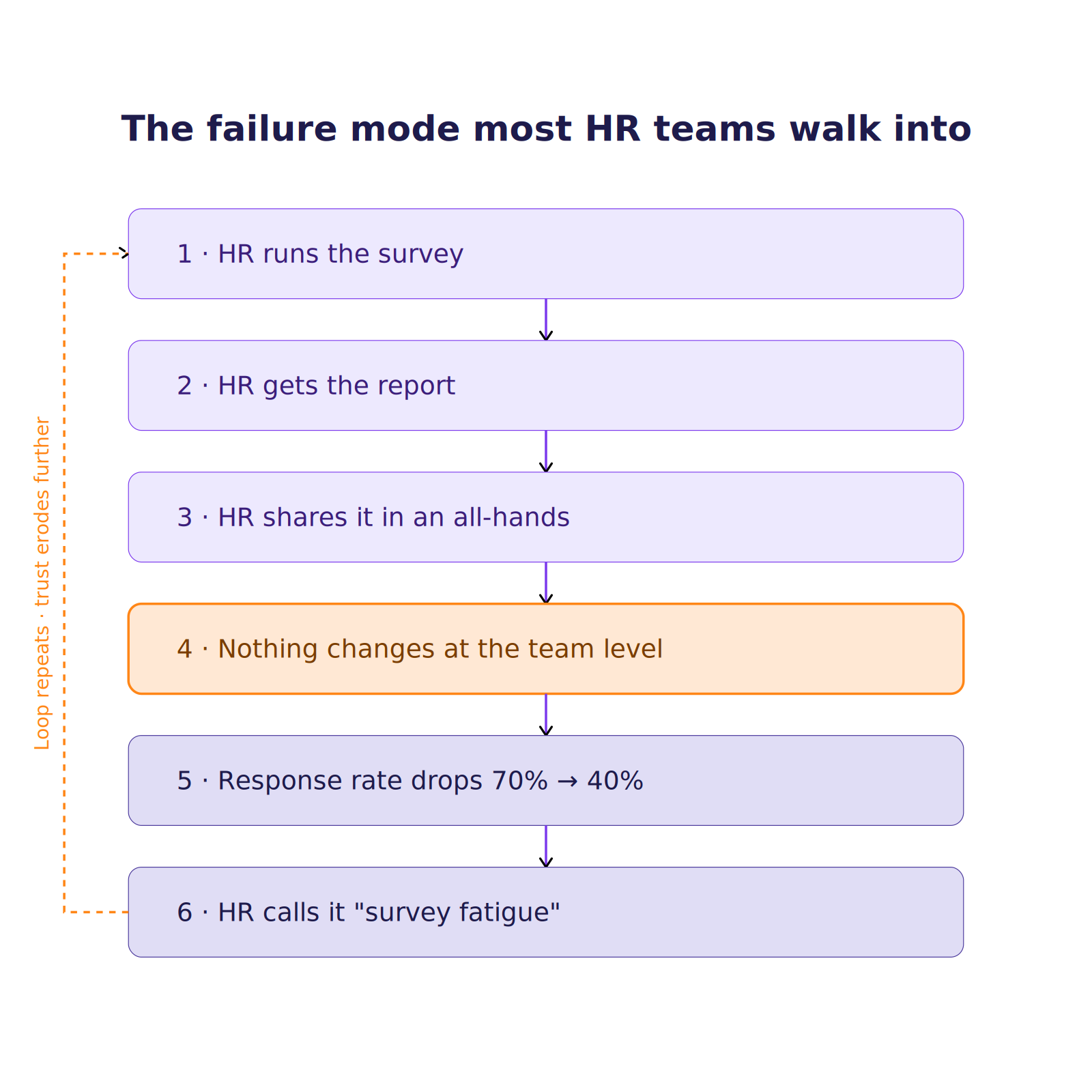
The failure mode most HR teams walk into
Here’s the pattern:
 The real cause is the manager layer being skipped. Four rules prevent that.
Rule 1: Every manager gets their own team-level dashboard
Not the company average. Not a filtered slice. Their own team’s score, provided the segment meets your anonymity threshold.
Teams under the threshold get rolled into a departmental view. The manager still sees data that belongs to them.
In Peoplebox.ai, every manager gets a team-level engagement dashboard for their direct reports, filtered automatically to respect the anonymity threshold. If a manager’s team is too small, they see a rolled-up departmental view instead of nothing.
A note on anonymity worth being explicit about
Even admins shouldn’t be able to see individual responses. In demo conversations with mid-market HR leaders, this is one of the first questions buyers ask.
Most tools quietly give admins full visibility, which defeats the purpose of anonymity.
Whichever tool you pick, ask directly: Can the super-admin see who said what? If the answer to anonymous surveys is anything other than a flat no, you have a problem.
In Peoplebox.ai: anonymous survey responses are locked from admin view at the platform level. Even the super-admin can only see aggregated results. This is enforced in the same way as compensation data is siloed from the wider admin view.
Rule 2: Every manager gets a one-page primer
HR builds this once and reuses it every cycle. The primer covers:
- How to open the conversation with the team
- How to read the scores
- Three questions to ask
- What to commit to in the room
Without the primer, half your managers will avoid the conversation because they don’t know how to run it.
Rule 3: Every low-scoring category gets a named action owner and a 30-day target
No orphan scores.
A red score nobody owns will stay red next quarter and quietly signal to the team that nothing here changes.
Rule 4: Track share-back time as a leading indicator
Managers who share results with their team within 14 days see higher response rates the next cycle.
Treat share-back time as a leading indicator of program health.
What good tool support looks like
The best tool support for this layer looks less like a dashboard and more like a coaching workflow.
Team-level pulse scores should flow into the manager’s one-on-one meeting agenda, so the pulse data becomes the conversation instead of running alongside it.
How AI is changing employee pulse surveys in 2026
Three real shifts and one honesty note.
Shift 1: Open-text theming at scale
Five hundred open-ended comments used to require two to three days of manual analyst work. AI clusters them into 5-8 themes within minutes and surfaces representative quotes for each.
The real value: open-text data actually gets read. In the manual world, most open comments died in a spreadsheet.
In Peoplebox: Noah (Peoplebox’s AI) themes open-text responses at the aggregate level only. Managers see themes and representative snippets, never individual comments tied to a person. The theming layer sits inside the same platform as the pulse data, so no comments leave the system to reach an external AI.
Shift 2: Action-plan drafting for managers
A low team score on “my manager gives me useful feedback” can generate a suggested three-item action list. The manager reviews and edits before committing.
The AI lowers the activation energy for a manager who would otherwise stare at a red score and do nothing.
Shift 3: Predictive attrition patterns
Combined signals can flag teams with early attrition risk months before a resignation:
- Pulse trend data
- Engagement scores
- Manager-relationship signals
This is where pulse graduates from a listening tool to a retention tool. Pulse trends within a broader People Insights stack, alongside performance and growth signals, tell you where the risk actually lies.
How to choose a pulse survey tool: the buyer’s checklist
Here’s the checklist to use to score any vendor once you’re ready to buy a tool.
The 8 criteria
- Anonymity thresholds. Is the minimum number of respondents per segment configurable? Does the tool automatically hide data below the threshold? Are admins themselves blocked from seeing individual anonymous responses?
- HRIS integration. Does org structure sync automatically from your HRIS (BambooHR, HiBob, Workday, and so on)? Bi-directional, so terminations flow through? If your HRIS is a regional or in-house system without a public API, ask if the vendor supports connector-based integration through Zapier or Integromat as a fallback.
- Cadence flexibility. Weekly, monthly, quarterly, and event-triggered pulses without a new setup each time?
- Manager-level dashboards. Team-level views with the anonymity threshold enforced automatically, so a manager sees their own team’s data without HR filtering it by hand?
- Action tracking. Can you log commitments for each low-score category, including the owner and deadline, and pull a report on which actions were closed?
- Open-text AI analysis. Themes generated at the aggregate level without breaking anonymity at the manager view?
- Trended comparison and benchmarks. Beyond this cycle’s score, does the tool show this cycle against the last cycle, this year against last year, and against industry or company-size benchmarks? This is the single most-asked question in buyer conversations, and most tools ship only current-period views.
- Integration with your performance and OKR stack. Does the pulse tool live within the same platform as your review cycles and goals, or is it another point solution to log in to?
That last one is where most standalone pulse tools quietly lose.
A pulse score is more useful when it appears alongside the same employee’s goal progress, last review rating, and open 1:1 action items. That’s when a low team score turns into a real conversation instead of another slide in the HR readout.
How Peoplebox scores against these criteria
Peoplebox Engagement Surveys sits inside the same platform as OKRs, performance reviews, calibration, 1:1s, and IDPs.
- Anonymity: admins can’t see individual responses on anonymous surveys. Enforced at the platform level.
- Notifications: manager-level nudges flow through Slack or Microsoft Teams.
- AI: Noah (Peoplebox’s AI) can rewrite manager comments and draft action starters.
- Trended dashboards: prior-year comparisons are set up per customer during onboarding.
- HRIS fallback: if your HRIS is a local system without a public API, connector-based integration via Zapier or Integromat is an option.
Why does the Employee Pulse Survey Fail
Mistake 1: Launching without a named action owner
Result: results email sent, nothing changes, cycle two gets a 30% response rate.
Mistake 2: Rewriting the questions every cycle
Result: you can’t trend anything.
The core bank has to stay fixed. Add new questions in additive slots. Don’t replace baseline ones.
Mistake 3: Reporting only the company-wide average
Result: struggling teams disappear behind the mean.
The team with a 4.6 offsets the team with a 2.4. Both look like a 3.5 to the CEO.
Mistake 4: Sending too often for your action bandwidth
Result: survey fatigue at a monthly cadence, even though your organization can realistically act only quarterly.
Match cadence to what you can actually respond to.
Mistake 5: Skipping the manager layer
Result: team-level signals go nowhere, and leadership wonders why engagement isn’t improving.
This is the failure that hides the longest because everything looks fine on the company-wide dashboard.
Conslusion
Pulse survey mechanics are simple. The hard part is program discipline:
- Closing the loop within 14 days
- Giving managers their own data with a coaching layer
- Matching cadence to the action bandwidth you actually have
Here’s the underrated part.
Most tools treat a pulse survey as a survey. In practice, the pulse score is only useful when it is shown alongside the same employee’s OKR progress, last review rating, and open 1:1 action items. That’s when a low team score turns into a real conversation the manager can actually run.
If you want to see how the pulse layer integrates with performance, OKRs, and 1:1s on a single platform, take a look at Peoplebox Engagement Surveys.
FAQs
How many questions should an employee pulse survey have?
5 to 15 questions depending on cadence.
- Weekly or bi-weekly pulses: 5 to 8 questions
- Monthly or quarterly pulses: 10 to 15 questions
- Hard cap: 15 questions, to protect completion rate
How often should you send a pulse survey?
Start monthly with 8 questions for a first program at a 100 to 500-person company.
Move to bi-weekly only after you’ve proven the close-the-loop muscle, meaning results are being shared, and actions are being taken without HR chasing every step.
Should employee pulse surveys be anonymous?
Yes, with a minimum respondent threshold of 5 to 10 per reporting segment.
Anonymity is the reason employees give you honest data. Break it once, even accidentally, and the program never fully recovers.
What is the difference between a pulse survey and an engagement survey?
- Engagement survey: annual, comprehensive (40 to 80 questions), slow to act on.
- Pulse survey: short (5 to 15 questions), recurring, focused on one theme, built to be acted on within 14 days.
What is a good pulse survey response rate?
- 65% or higher: strong
- 50% to 65%: workable
- Below 50%: your data may not represent the workforce. Be cautious when drawing conclusions, especially for smaller segments.
Perceptyx benchmark data shows most pulse surveys fall between 55% and 81%.
Pulse survey mechanics are simple. The hard part is program discipline:
- Closing the loop within 14 days
- Giving managers their own data with a coaching layer
- Matching cadence to the action bandwidth you actually have
Here’s the underrated part.
Most tools treat a pulse survey as a survey. In practice, the pulse score is only useful when it is shown alongside the same employee’s OKR progress, last review rating, and open 1:1 action items. That’s when a low team score turns into a real conversation the manager can actually run.
If you want to see how the pulse layer integrates with performance, OKRs, and 1:1s on a single platform, take a look at Peoplebox Engagement Surveys.
Author

Shivani Dhiman is a Content Writer at Peoplebox.ai, bringing over 6 years of experience in creating insightful, research-backed content across HR, workplace culture, and people operations. With a strong foundation in communication and HR-focused writing, she specializes in turning complex concepts—from performance management to AI-driven HR tools—into clear, actionable insights for leaders and people teams.
At Peoplebox.ai, Shivani focuses on crafting content that helps organizations improve decision-making, strengthen employee experience, and navigate the evolving world of modern HR and workplace technology. Her writing blends deep research with a practical understanding of how HR teams operate in fast-growing companies.
With 6+ years in the content domain, Shivani brings a thoughtful, structured, and human-centric approach to every piece she creates.
Outside of work, she enjoys exploring the latest HR tech trends and brainstorming creative ideas to make HR content more engaging and relatable
View profile 
Top Picks




YOU'VE READ THE PLAYBOOK
Now see it running - live, on your org chart
A 30-minute walkthrough of reviews, goals and 1:1s inside Slack & MS Teams. No slides, just the product.
Request a Demo